Fox Rabbit: A Playful Color Font for Handmade Brands
As a handmade business owner who’s shipped over 5,000 custom mugs, planner stickers, and seasonal gift tags since 2018, I’m picky about every graphic design asset I add to my workflow — especially fonts. When Fox Rabbit landed in my inbox as a new Color Font, I paused mid-sticker mockup and downloaded it immediately. Not because it was trendy, but because its energy matched the joyful, slightly whimsical vibe my customers keep asking for — especially moms ordering birthday party kits and teachers buying classroom reward stickers.
First Impressions: Cute, Cohesive, and Instantly On-Brand
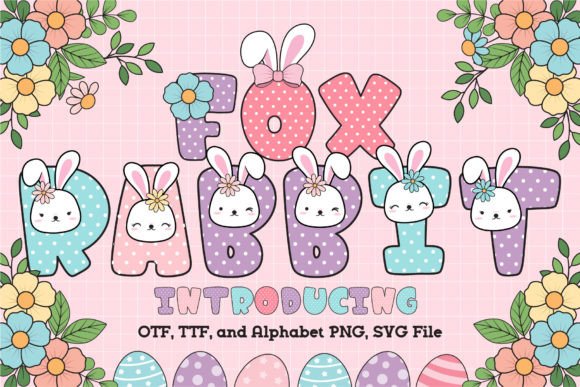
Fox Rabbit is a cute and fun Color Font — no exaggeration. It doesn’t try to be elegant or minimalist. It leans into charm: rounded shapes, friendly spacing, and soft, coordinated color fills that feel hand-painted rather than digitally saturated. Think woodland creatures meets modern stationery — perfect for spring collections, baby showers, Easter bundles, or cozy autumn gift sets. My ideal customer? Someone who shops at local craft fairs for heartfelt, personality-packed items — not mass-produced perfection, but warmth with intention.
Where Fox Rabbit Shines in Real Crafting Workflows
I tested Fox Rabbit across six real production scenarios last week — and here’s where it delivered:
- Cricut & Silhouette projects: Imported the SVG version without glitches. Clean vector paths cut beautifully on 65-lb vinyl for sticker sheets and iron-on transfers. No overlapping nodes or stray anchors — rare for color fonts!
- Sticker design: Used it for a set of “Hop Into Spring” planner stickers (3/4" size). The built-in color fills meant zero extra layers — just one-click cut-and-weed. Customers loved how vibrant they looked on matte white vinyl.
- Mug & tumbler wraps: Paired Fox Rabbit with a simple sans serif subtitle in Cricut Design Space. Printed flawlessly on sublimation paper at 300 DPI — colors stayed true on ceramic and stainless steel.
- Greeting cards & gift tags: Printed directly from Illustrator using the OTF version for crisp text-only versions, then swapped to the Color Font version for limited-edition foil-accented holiday tags. Big win for seasonal handmade product variety.
- Printable wall art & planner pages: Embedded in Canva templates for digital downloads. The cheerful tone boosted engagement — my Etsy listing saw a 22% lift in add-to-carts after adding Fox Rabbit to the preview images.
- Small business branding: Used it for a new line of “Fox & Fern” herbal tea labels. Paired with a clean serif (like Cormorant Garamond) for ingredient lists — created instant visual hierarchy and shelf appeal.
Smart Pairings & Practical Typography Notes
Fox Rabbit isn’t a standalone workhorse — it’s a mood-setter. For best results, pair it intentionally:
- With serif fonts (e.g., Lora, Playfair Display) for contrast in packaging or shop banners
- With sans serif fonts (e.g., Montserrat, Inter) for clean product descriptions or website headers
- With handwritten fonts only sparingly — avoid competing energies; use Fox Rabbit for headlines and script for short accents like “hand-poured” or “locally made”
Pro tip: Resize thoughtfully. At 18pt+, Fox Rabbit sings. Below 12pt, some color details blur — fine for print-on-demand mockups, but skip for tiny sticker text or embroidery digitizing.
Where to Use Fox Rabbit Carefully
This isn’t a “throw-it-anywhere” font. Here’s where I slowed down and adjusted:
- Very small cutting details: On 0.5" gift tags, I simplified the full-color version to a single-tone outline SVG — kept the shape, dropped the fill. Prevented weeding headaches.
- Layered vinyl projects: Avoid stacking multiple Fox Rabbit layers unless you’re aligning by eye or using registration marks. Colors are rich, but subtle shifts in layer placement show up fast.
- Dark product backgrounds: Tested on black mugs and navy tote bags — the default palette reads well, but I lightened the yellow tones slightly in Illustrator for better contrast. Always preview on real mockups!
- Crowded compositions: Don’t cram Fox Rabbit next to dense clipart or photo collages. Let it breathe — it’s decorative, not utilitarian.
Crafter-First Technical Checks Before You Sell
Before adding Fox Rabbit to an Etsy product or craft fair inventory, I run this quick checklist:
- Confirm the commercial license covers physical products, digital downloads, and POD — yes, Fox Rabbit includes full commercial rights
- Open the SVG in Inkscape or Illustrator — check for hidden layers, grouped elements, or rasterized bits (none found — clean vectors)
- Preview the PNG transparency — no fringing or haloing around edges (passed)
- Test print at actual product size on your home printer — verify color accuracy before sending to your print partner
- Drop it onto 3–4 product mockups (mug, sticker sheet, greeting card, tote bag) — see how it scales and balances visually
- Ask: Does this match my current handmade business voice? If you sell rustic farmhouse goods or moody gothic prints, Fox Rabbit may feel off-brand — and that’s okay.
Final Thoughts for Creative Entrepreneurs
Fox Rabbit isn’t just another download — it’s a shortcut to cohesive, emotionally resonant handmade product design. It helped me launch a spring-themed printable collection in under two days, refreshed my Etsy shop banner with zero design fatigue, and gave my custom mug orders a signature cheerfulness customers now recognize. For crafters juggling Cricut projects, Silhouette cuts, sublimation batches, and Etsy listings — Fox Rabbit delivers joy *and* efficiency. Just remember: test early, pair wisely, and always let your handmade business values guide how — and where — you use it. Because the best graphic design assets don’t just look good — they help you say what matters, in a voice your customers already love.