Whatcha Wildflower: A Playful Color Fonts Choice
As someone who’s launched over 200 digital product listings across Etsy, Creative Market, and Shopify—and shipped thousands of printable designs, SVG bundles, and Canva templates—I opened Whatcha Wildflower expecting charm, not chaos. What I found was a cohesive, hand-drawn color font that leans into joyful imperfection without sacrificing usability. It’s not “cute for cute’s sake.” It’s a graphic design asset built for real selling scenarios—especially when your audience responds to warmth, whimsy, and tactile authenticity.
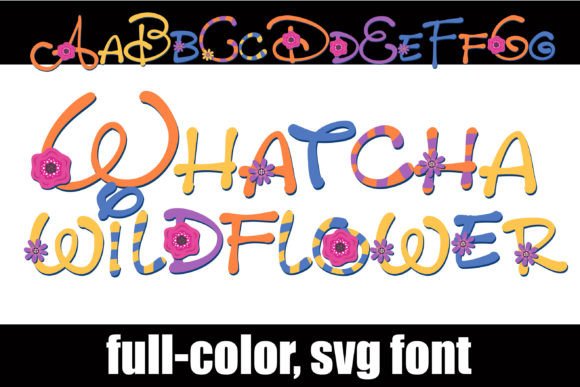
The first impression is floral, yes—but more importantly, it’s *intentional*. This full-color font layers soft watercolor florals over lively handwritten letterforms, with each glyph rendered in coordinated pastel-to-vibrant hues. There’s an alternate character set offering extra color variations, accessible via OpenType features or the Silhouette Studio glyph map. No extra plugins needed—just system-level font support or standard design software workflows.
Who’s This For? (And Who Should Pause)
Whatcha Wildflower speaks directly to sellers targeting feminine, nature-inspired, or small-batch handmade audiences: nursery decor shops, wedding stationery designers, planner sticker creators, and seasonal digital download sellers (think spring bundles, Mother’s Day kits, or botanical-themed Canva templates). It reads as approachable but not childish—whimsical without veering into cluttered or overly juvenile territory.
It’s less ideal for minimalist branding projects, corporate social media graphics, or text-heavy product labels where clarity trumps decoration. If your shop thrives on clean sans-serifs and tight visual hierarchy, this isn’t your workhorse font—it’s your accent voice.
Real-World Product Testing Before You List
I tested Whatcha Wildflower across six live product categories before publishing anything:
- Printable wall art: Used it for a “Bloom Where You’re Planted” quote poster—scaled cleanly at 12×16”, held detail well in PDF and PNG exports.
- Cricut project files: Exported letters as SVGs; cut lines stayed crisp, though I avoided using floral glyphs for intricate weeding—saved those for layered overlays instead.
- Sublimation mug designs: Paired with a simple serif body font for contrast; the color-rich glyphs popped beautifully on white ceramic.
- Canva template kits: Built editable invitation layouts where buyers could swap names while preserving floral integrity—no pixelation, even after multiple resizes.
- Digital sticker sheets: Exported individual letters as transparent PNGs (300 DPI); worked flawlessly in Procreate and GoodNotes.
- Etsy listing thumbnails: Rendered at 800×800px—stood out in search results thanks to its color density and organic shape variation.
Where It Elevates Your Product Presentation
This font shines where visual storytelling matters most. In product mockups, Whatcha Wildflower adds instant personality—imagine it on a linen tote bag mockup or a framed nursery print preview. Its color depth helps thumbnails pop in crowded marketplaces like Etsy or Creative Fabrica. When bundled with coordinating clipart (e.g., matching floral swashes or leafy borders), it strengthens perceived value and brand consistency across digital download collections.
For small business branding, it works best as a secondary display font—not your logo’s primary typeface, but the perfect choice for feature headers, seasonal banners, or packaging accents. It signals care, craft, and attention to mood—qualities customers associate with premium handmade businesses.
Where to Use It Carefully
Avoid Whatcha Wildflower in contexts demanding precision or neutrality:
- Tiny planner sticker details (under 12pt size)—floral elements blur or vanish.
- SVG cut files meant for fine-detail vinyl—we recommend using only the base letterforms, not embedded florals, for clean cuts.
- Dark background applications without testing contrast first—some lighter pastel glyphs fade.
- Text-dense layouts like multi-page workbooks or legal disclaimers—its decorative weight competes with readability.
- Low-resolution print products (e.g., budget greeting cards printed at 150 DPI)—colors may bleed or mute.
Practical Seller Notes Before You Upload
Before adding Whatcha Wildflower to your next digital product, do these five checks:
- Preview it on both white and dark mockup backgrounds—note which glyphs retain legibility.
- Export sample PNGs and SVGs; verify transparency holds and cut paths remain intact in Silhouette Studio or Cricut Design Space.
- Test commercial licensing terms—confirm you’re cleared to use it in finished goods (e.g., t-shirts, mugs) and digital downloads sold to end users.
- Pair it intentionally: try it with a neutral sans-serif (like Montserrat) for balance, or a delicate serif (like Cormorant Garamond) for elevated contrast.
- Organize deliverables clearly—label alt-case glyphs separately, include a quick-start PDF showing glyph access steps for non-design-savvy buyers.
Used thoughtfully, Whatcha Wildflower isn’t just another decorative font—it’s a versatile, commercially viable color fonts tool that supports stronger visual storytelling, better thumbnail appeal, and more distinctive digital product positioning. It won’t replace your core typography stack, but it’ll give your spring collection, botanical bundle, or greeting card line exactly the kind of warmth and authenticity today’s buyers actively seek.
If you’re building a creative marketplace presence where emotion drives clicks—and where printable design, SVG design, and social media graphics need to feel cohesive and intentional—Whatcha Wildflower earns its place in your design assets library. Just test it early, pair it wisely, and let its color-rich personality do the talking.